Hi,
after some years I wanted to use Pokertracker 4 again. After start, it said "can´t connect to database" or "could find database" or whatever. So I deinstalled Pokertracker 4, removed the user folder, deinstalled Postgres and removed the database folder.
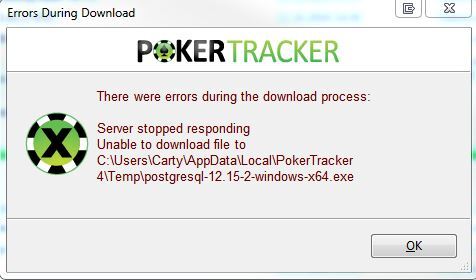
Downloaded latest Pokertracker version and installed. It worked and after start it says, if I want to PT4 to install Postgres. I click yes and it downloading the file. After it installs and the following error appears:
https://s20.directupload.net/images/240116/kyywdmsa.jpg
After clicking ok, it says "Cannot complete postgres installation" and the progess closes...I tried a second time, same results

Error Postgres Installation
Moderators: WhiteRider, kraada, Flag_Hippo, morny, Moderators
2 posts
• Page 1 of 1
Error Postgres Installation
 by Carty87 » Tue Jan 16, 2024 3:07 pm
- Carty87
- Posts: 14
- Joined: Mon Dec 17, 2012 2:52 pm
Re: Error Postgres Installation
by Flag_Hippo » Wed Jan 17, 2024 6:56 am
In that case please manually download and install PostgreSQL v12 from here and for the two password boxes use 'dbpass' (no quotes) which is what PokerTracker 4 uses by default. If that says it installed successfully then try starting PokerTracker 4 again.
- Flag_Hippo
- Moderator
- Posts: 17051
- Joined: Tue Jan 31, 2012 7:50 am
2 posts
• Page 1 of 1
Who is online
Users browsing this forum: No registered users and 9 guests